At Aguru AI, we built our AI workflow engine on top of Temporal. Temporal is a durable execution layer that allows you to build long-running workflows that can survive crashes and restarts. It is a powerful tool, but it is not a magic bullet. Here are five hard truths I wish I knew before running Temporal in production.
My first contact with Temporal
When I first opened the temporal.io site, I saw this simple snippet in their hero section.
const { callLLM, runTool } = proxyActivities<typeof activities>({
  startToCloseTimeout: "1 minute",
});

export async function agentWorkflow(goal: string): Promise<string> {
  const messages = [{ role: "user", content: goal }];
  while (true) {
    // Agent loops until it decides it's done
    // LLM calls automatically retry on failure
    const response = await callLLM(messages, tools);

    if (!response.toolCalls) {
      // Agent is done
      return response.content;
    }

    // Tool execution is durable - survives crashes
    const result = await runTool(response.toolCall);

    // Add LLM response and Tool result to the agent context
    messages.push(response.message);
    messages.push({ role: "tool", content: result });
  }
}
In case you wonder, this is a simple agent implementation running inside Temporal. As simple as it looks, the effort I spent getting this little snippet to run reliably in production was an entirely different game.
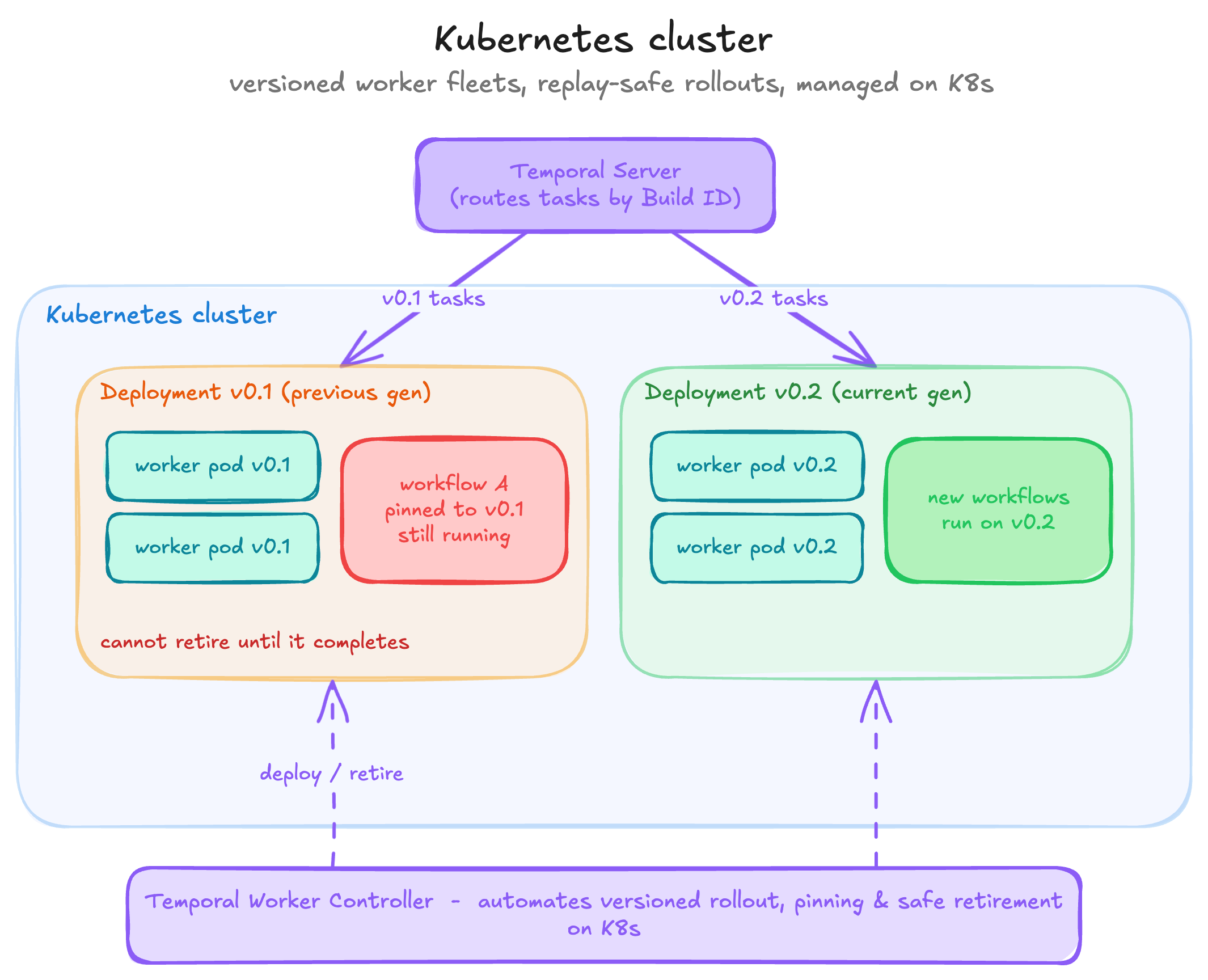
I ended up running a Kubernetes cluster
Here’s why:
- Temporal is a distributed system. In production, you typically run a fleet of workers to process workflow and activity tasks.
- Temporal workflows are often long-lived (days, weeks, or longer) and must stay replay-safe. Any breaking workflow code change requires a careful rollout. Older executions may need to keep running on the worker version they started with.
- In practice, you often run multiple deployment generations at once (for example,
v0.1andv0.2) and cannot fully retirev0.1workers until workflows pinned to that version have completed. - I had to manage worker versions (Build IDs) carefully. Reusing the same version for breaking changes can break running workflows. But bumping versions too often can increase cluster size and cloud cost. The rule I settled on: when in doubt, bump the worker version to stay safe.
- One issue I still struggle with is that a single long-running workflow pinned to an older worker version can block worker retirement, creating operational overhead and increasing cloud costs.
Doing all of this yourself on Kubernetes is a lot of work. That’s why Temporal built the Worker Controller, which makes worker deployments on Kubernetes safer and easier.
I’ll publish a dedicated post about setting up a Kubernetes cluster for Temporal with Worker Controller, and I’ll link it here once it’s available.
I learned Temporal can feel slow
Temporal is designed for durability and scale, but that durability adds orchestration overhead. Each workflow step goes through the Temporal service: a task is scheduled, picked up by a worker, completed, and then the next task is scheduled. That coordination gives you reliability, retries, and recovery, but it also adds latency compared to running the same logic in-process.
In the agent example above, a regular script can run loop iterations quickly in memory. In Temporal, each iteration typically involves multiple round trips between workers and the Temporal server (workflow task, activity task, completion, next task scheduling, and so on).
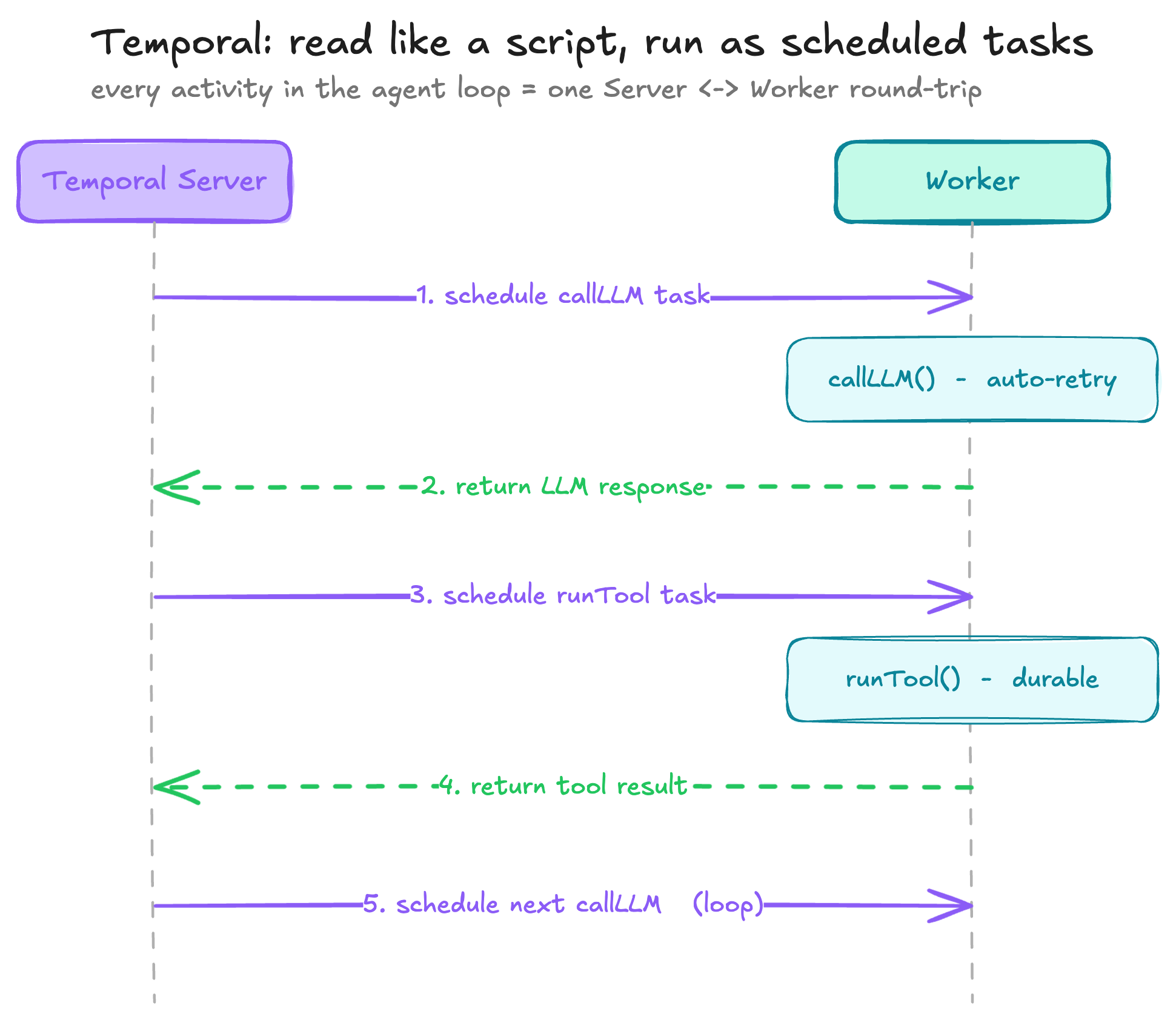
The trade-off is throughput and operability at scale. A single workflow may feel slower, but Temporal can run many workflows in parallel very effectively. If you run on Kubernetes, scaling is often straightforward: increase worker replicas.
In short, Temporal workflows look like normal code, but they execute as durable, scheduled work. For our long-running, fault-tolerant systems, that trade-off has been worth it—I just learned to account for the added per-step latency on the paths where latency actually matters.
I need idempotency keys for critical activities
Temporal provides at-least-once activity execution, not strict exactly-once execution. In most cases, an activity runs once. But in rare failure windows, it can run more than once.
For example, a worker might complete an external side effect (like charging a card) and then crash before reporting success to Temporal. Temporal then sees the activity as incomplete and may retry it, which can trigger the same external action again.
This is not a Temporal bug; it is a normal distributed-systems trade-off.

So I made our critical activities idempotent. I added idempotency keys anywhere a duplicate side effect would be costly—especially around billing, payments, and other high-impact operations.
I stopped treating Temporal as my data store
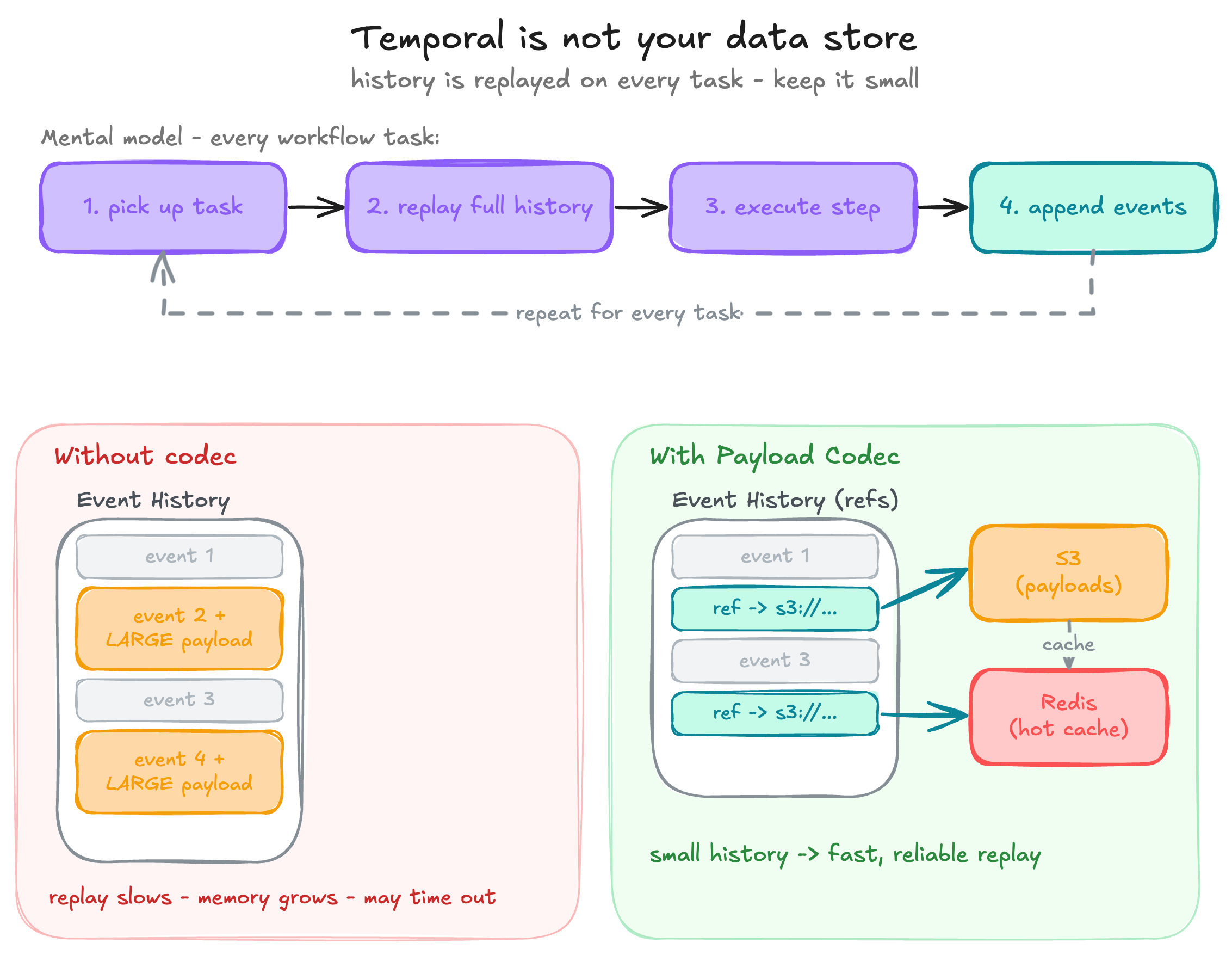
Temporal recovers workflows by persisting an event history and replaying it on workers. That means workflow history should stay small.
If activities return large payloads, that data is written to history. Over time, replay slows down, worker memory usage grows, and in severe cases workflows may fail to replay reliably because workers can time out while rebuilding state.
A useful mental model: whenever a worker picks up a workflow task, it replays the full history to reconstruct workflow state, executes the next step, then appends new events.
That’s why Temporal provides Payload Codec, so you can move large payloads to external storage and keep only references in history. At Aguru, we offload payloads to S3 and use Redis as a hot cache to speed up replay.
I must keep a close eye on Continue-As-New (CAN)
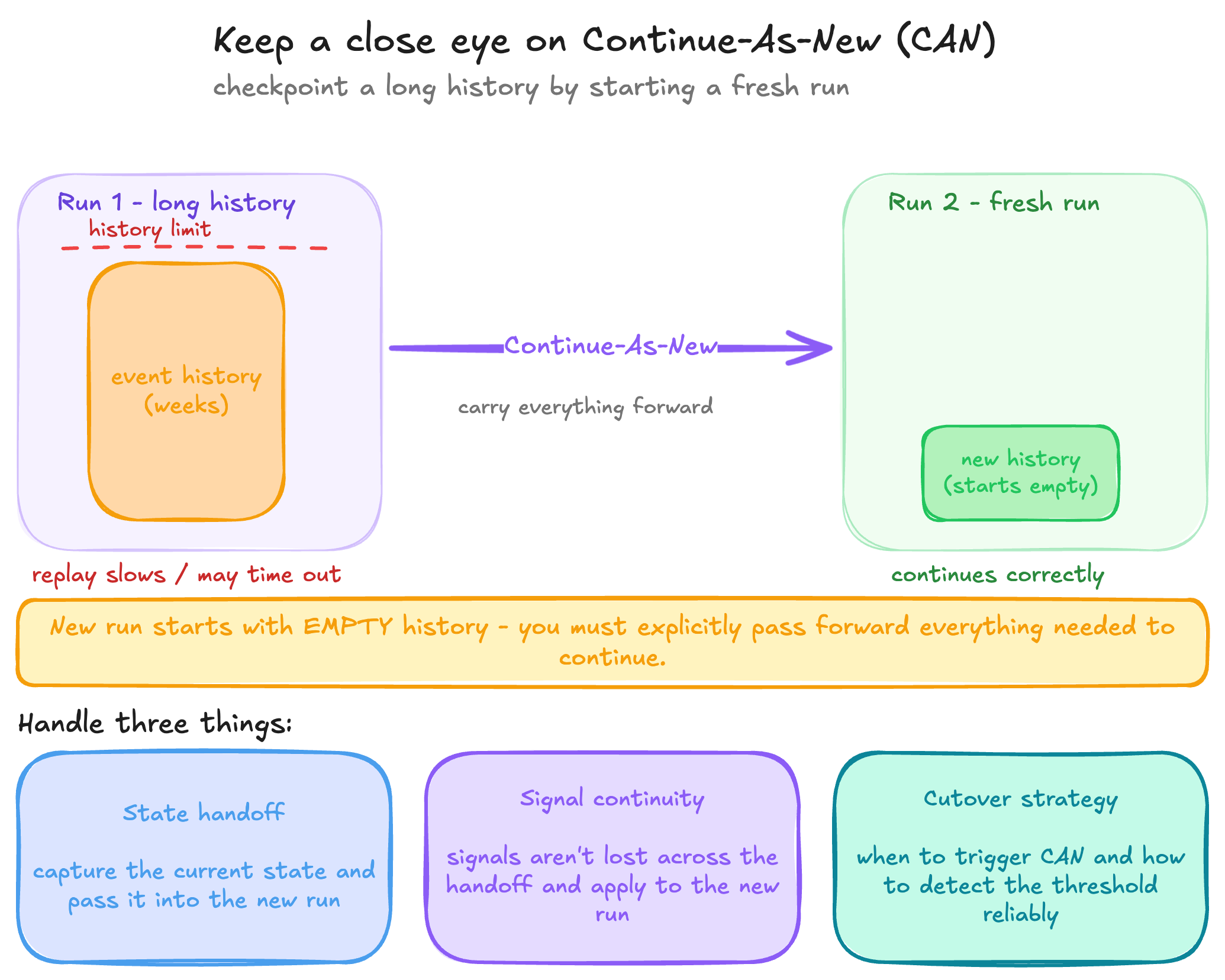
At Aguru, we built AutoCert, an AI agent for end-to-end UK certificate renewal on top of our workflow engine. These workflows can run for weeks, and over time they can accumulate a large event history. If history grows beyond recommended limits, replay can slow down and may even time out.
Temporal’s recommended pattern is Continue-As-New, which checkpoints state by starting a fresh run with a new history. At first, it sounds like a simple reset button—but there is an important nuance: the new run starts with empty history, so you must explicitly pass forward everything needed to continue correctly.
To use CAN safely in production, I had to get three things right:
- State handoff: capture the current workflow state and pass it into the new run.
- Signal continuity: ensure signals are not lost across the handoff and are applied to the new run.
- Cutover strategy: decide when to trigger Continue-As-New and how to detect that threshold reliably.
This topic deserves its own deep dive. I’ll publish a dedicated post and link it here when it’s ready. In the meantime, these two articles by Long Quanzheng are excellent references:
- Guide to ContinueAsNew in Cadence/Temporal workflow, using iWF as an example — Part 1
- Guide to ContinueAsNew in Cadence/Temporal workflow, using iWF as an example — Part 2